5.3 Defining Functions
| Goals: |
|
A function produces well-defined output for some given input. Recall that the library numpy contains the elementary functions found on a scientific calculator (and many more). The power of Python, however, lies in the ability to create our own functions.
The beginning of a function definition begins with the command def. Here’s an example, where we define a new function ln that returns the natural logarithm of an input
Including a line that loads numpy, enter the above into IDLE, and run the module. If you execute ln(3) in the shell, you’ll get the same thing as log(3). Figure 5.13 shows the results:
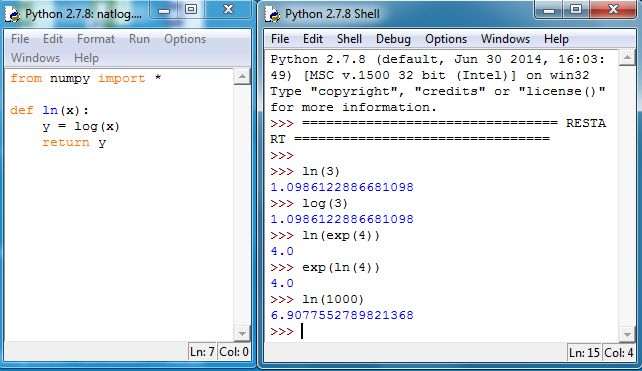
Some more comments:
-
1.
In Python, lines of code are grouped by indentations of four spaces. The editor IDLE will automatically indent, easing some work on entering commands. Once a command is indented by an amount less than the prior, the grouping is finished. This will be illustrated in Section 5.4.
-
2.
If you indent by a non-multiple of four, you will get a syntax error. You’ll get the hang of this after some trial and error.
-
3.
The colon indicates the beginning of the grouped code within the function definition. If the colon isn’t there, IDLE won’t automatically indent, and when you run the module, you’ll get a syntax error.
-
4.
The print command can be used to display some activity within a function, but return is special in that when it is executed, the function exits and returns the value to right of return.
5.3.1 randbetween
A function from numpy that we will use frequently generates (pseudo) random numbers similar in fashion to Excel’s The command, random.randint, works as follows: If m and n are integers with m n, then random.randint(m,n) will generate a random integer with
with each possible integer equally likely. Note that the inequality on the right is strict. For example, executing random.randint(0,2) will generate 0’s and 1’s, with each value equally likely. The strict inequality on the right is annoying, but we can define a new function randbetween that behaves exactly like Excel’s as follows:
Figure 5.14 illustrates the function:
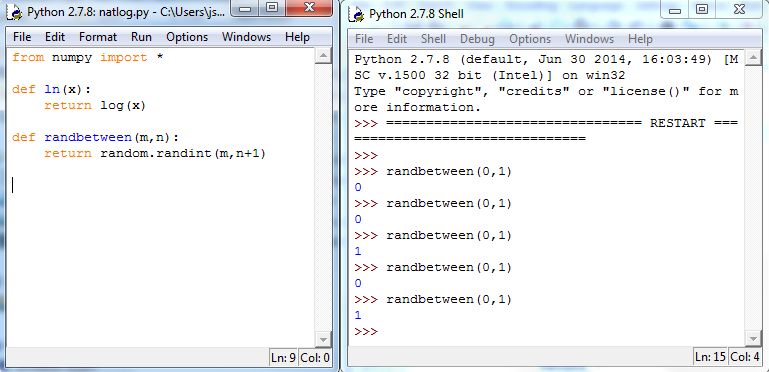
Note: The second def command in Figure 5.14 is to the left of the return command, and hence, it is not grouped within the prior def command.
5.3.2 Exercises
-
1.
Answer the following as True or False.
-
(a)
The command to start a function is def.
-
(b)
The command return returns a value back to the Shell.
-
(c)
A script can only have one function.
-
(d)
The function randbetween created in the example above is meant to mimic the command in Excel.
-
(e)
The command randint(0,3) will generate 0’s, 1’s, 2’s, and 3’s.
-
(a)
-
2.
In IDLE, write a function that takes input and returns
-
3.
In IDLE, write a function that does the following:
-
(a)
Uses input to ask the user for a number.
-
(b)
Uses input to ask the user for another number.
-
(c)
Returns the product of the two numbers.
-
(a)
-
4.
Create a function that takes the radius of a circle and returns the area of a circle. Recall the area of a circle is , where is the radius of the circle and is the numeric value of pi. You will need numpy to call pi.