5.4 Branching
| Goals: |
|
Chapter 4 introduced Excel’s command. In this section, we will introduce the equivalent if command in Python, which is, from a visual standpoint, more friendly to read and construct.
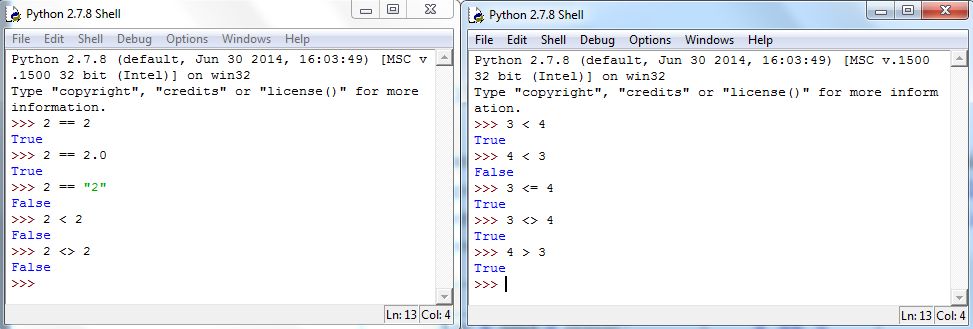
First, however, we must introduce another data type: boolean. Unlike number-types or strings, boolean has only two possible values: True or False. In Python, there are certain comparisons that will evaluate to True or False. The following table gives those we will use:
Figure 5.15 shows two Shell windows with examples:
In the following, let and denote a boolean values, i.e., something that evaluates to True or False. Here’s how the if statement works:
Notes:
-
1.
The else part is optional, i.e., a standalone if is okay.
-
2.
The elif part may also be optional, given the scenario.
-
3.
As with the def command, the colon : denotes the beginning of the group of command(s) to execute. If one forgets the colon, IDLE won’t auto-indent and the Shell will give a syntax error. And, as with the def examples prior, grouping is done by indenting in multiples of 4; any other number of indentations will cause a syntax error.
Some examples:
Concepts Check: 1. What is the output of the following?
5.4.1 Exercises
-
1.
Answer the following as True or False.
-
(a)
There is no difference between = and ==.
-
(b)
The syntax >< is used to denote not equal to.
-
(c)
Boolean values consist of only True, False, or Maybe.
-
(d)
Indentation is necessary for if statements.
-
(e)
The else part is required in all if statements.
-
(a)
-
2.
Write a function that takes as input a number and outputs the following: if is greater than 5, return 9; otherwise return 3.
-
3.
Write a function that uses randbetween to randomly generate an integer between 0 and 2, inclusive. The function returns ”Yes” if is equal to 0, ”No” if is 1, and ”Maybe” otherwise.